Domain Health Redesign: Centralized Issues, Progress Tracking & Instant Deep-Dives
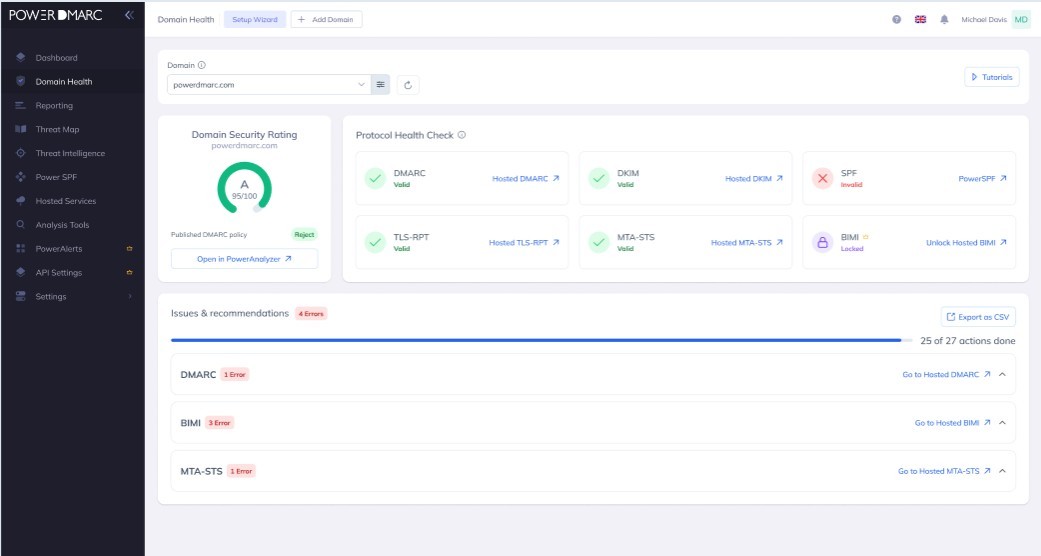
Faster Navigation, Clearer Issue Resolution, and a Modernized Security Overview We have completely overhauled the Domain Health dashboard to make managing your domain’s email authentication protocols faster, cleaner, and more intuitive. By reorganizing protocol statuses, consolidating recommendations, and elevating your overall security score, security teams can now identify and fix misconfigurations with far less friction. Key Highlights & UI Improvements Prominent Domain Security Rating Card: Your overall security grade (e.g., A 95/100) and published DMARC policy state are now positioned right at the top left alongside a direct "Open in PowerAnalyzer" shortcut for instant deep dives. Unified Protocol Health Check Grid: Protocol status cards (DMARC, DKIM, SPF, TLS-RPT, MTA-STS, and BIMI) are now neatly arranged in a balanced grid featuring direct navigation links (e.g., Hosted DMARC ↗, PowerSPF ↗) to quickly jump to hosted management features. Consolidated "Issues & Recommendations" Section: Replaced the separate, cluttered side-by-side "Actions Needed" and "Errors" panels with a unified, expandable issues list. Progress Tracking Bar: A prominent visual progress bar now displays your exact remediation status (e.g., 25 of 27 actions done). Grouped Protocol Error Counts: Errors are cleanly organized under dedicated protocol accordions with color-coded badge counters (e.g., DMARC: 1 Error, BIMI: 3 Errors) for efficient troubleshooting. One-Click CSV Export: Added a handy Export as CSV button directly inside the issues panel to share action items with your team offline. Interface Breakdown: What Changed? Top Navigation & Domain Selection Sleek, rounded control inputs for domain selection and quick action buttons (Setup Wizard, + Add Domain, Tutorials). Security Rating & Protocol Grid Security Score Card: Displays your current letter grade, numerical score, and active DMARC enforcement level (Reject, Quarantine, or None). Protocol Status Badges: Visual indicators immediately highlight valid, invalid, missing, or locked protocol features with clear status text. Actionable Issues & Recommendations Expandable Accordions: Click on any protocol section (DMARC, BIMI, MTA-STS, etc.) to reveal detailed error explanations and recommended fixes. Direct Action Links: Jump straight to the hosted solution page for any specific issue with a single click. Quick Summary of Visual Changes Domain Security Rating: Moved from the right side panel to the top-left highlight area. Protocol Health Check: Reorganized into a clean, 2-column horizontal grid. Action Items & Misconfigurations: Merged into a single expandable Issues & Recommendations block with progress tracking and CSV export.